
B.0 | Overview#
[1] Summary#
rivt is an open source Python project built around the rivtlib Python package and dependencies :ref:Project-requirements. It publishes a formatted rivt doc as a text, PDF or HTML file. from a rivt file - a Python file (.py) that imports the rivtlib Python package. rivtlib includes rivt API functions that implement rivt markup.
Groups of rivt files may be compiled and linked into a single rivt report. Collections of rivt files with related subject matter may be grouped together as a rivtbook. rivtbooks are organized for direct rivt file selection and insertion into rivt docs and reports
rivt files are generally edited and run in an IDE. The lightweight Pyzo IDE is installed with rivtlib. The VSCode IDE is a full featured IDE that is part of the basic [1] rivt frameworks and included with the [3] Portable rivt installable.
rivt file examples are illustrated here. Additional rivt files may be downloaded from Google Drive at OpenModels.info. An interface for searching public rivt files on GitHub is here.
A public rivt file is a subset of a rivt file, made up of sections the author chooses to share under an Open Source license. rivt is designed to seamlessly extract public files, allowing the author complete discretion in choosing which file sections to make public.
rivt is distributed under the MIT open source license. (see:ref:Licenses).
[2] Docs#
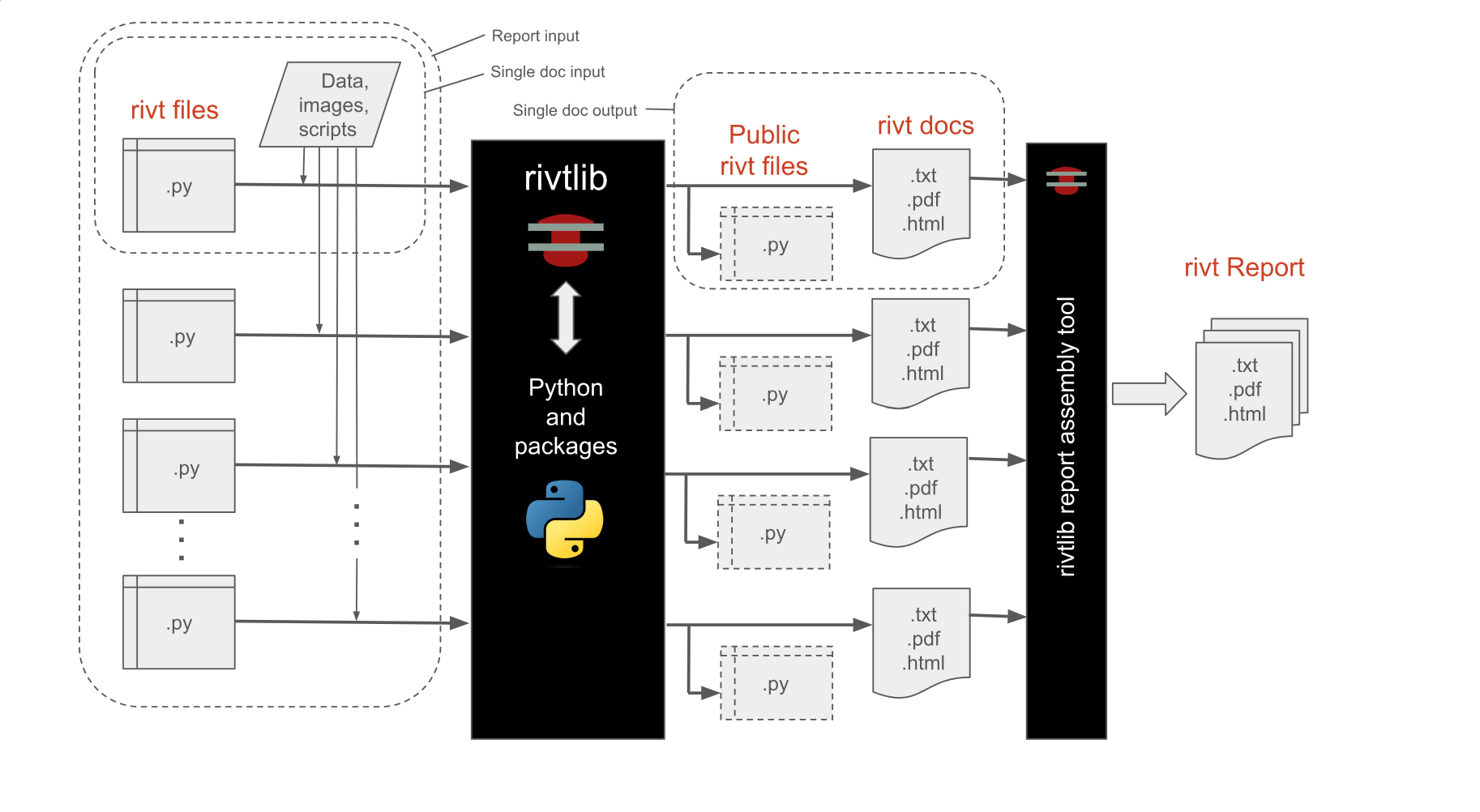
rivt Doc Processing
Each rivt file outputs a corresponding doc of the format specified in PUBLISH command of the rv.D() API. A rivt file number has the form:
rvAnn-filename.py
where rvAnn is a required file number prefix with A an alphanumeric character and nn a two digit non-negative integer. Corresponding rivt docs are output as:
rvAnn-filename.txt, pdf or html
A rivt report is organized using the file numbers. The file numbers are used to organize reports into divisions and subdivisions. Each rivt file or doc is a report subdivision. If the rivt filenames are:
rvA01-filename.py
rv105-filename.py
rv212-filename.py
the corresponding doc numbers in a report would be:
A.1 (division A, subdivision 1)
1.5 (division 1, subdivision 5)
2.12 (division 2, subdivision 12)
[3] API#
The rivt API includes API functions, [3] Tags and Commands and structured folders and files.
The API and markup are designed to be:
- lightweight
rivt markup wraps reStructuredText and uses fewer than three dozen tags and commands. rivt tags format lines or blocks of text and commands read and write files.
- extensible
rivtlib is written in Python with direct access to the large library of Python packages and functions. Python scripts and external programs can be integrated into a rivt doc.
- versatile
A rivt file produces a text, HTML or PDF doc. Multiple docs can be organized into reports. rivtbooks provide a convenient way to organize files around a subject matter. rivt can be run within a variety of IDEs.
- efficient
The file and folder settings produce clear, organized documents with default settings. Settings may also be customized for specific needs.
The API functions are listed in the table below, where (rS) is a triple quoted rivt string argument.
API Function |
Name |
Purpose |
|---|---|---|
rv.R (rS) |
Run |
Run scripts and markup |
rv.I (rS) |
Insert |
Insert static sources |
rv.V (rS) |
Values |
Calculate values |
rv.T (rS) |
Tools |
Execute shell scripts and external programs |
rv.D (rS) |
Doc |
Publish docs |
rv.S,X (rS) |
Skip |
Skip (S) section or Exit (X) |
An API function starts in the first column and takes a triple quoted rivt string argument containing a header substring and rivt markup. The first line of the rivt string is the header substring, followed by a content substring indented 4 spaces for improved readability and section folding.
The header substring specifies the section title and other processing parameters. The content substring includes rivt markup and arbitrary text. For further details see here.
API Function Syntax
rv._("""Section Label | parameters

     Content text that is
     indented four spaces.

    ...

    """)
[4] Files / Folders#
A rivt file is a Python plain text file ( .py ) that includes API functions and imports the rivtlib package into the rv namespace:
import rivtlib.rvapi as rv
rivt files are stored in a rivt root folder designated with the prefix rivt-. Each rivt file and corresponding rivt doc has a prefix used for document organization. The top level folder structure is shown below. A more detailed description of the folder structure is here.
rivt-Report-Label/           Report Folder
  ├── .vscode/                   optional VSCode settings
  ├── rivt-public_/              rivt-generated public files
  └── README.txt                 text doc or report
      ├── rvsrc/                    source files
      ├── README.txt                public text report or doc
      ├── rv-101-filename1.py       public rivt file
      ├── rv-102-filename2.py       public rivt file
      ├── rv-201-filename3.py       public rivt file
      ...
  └── rivt-report/               rivt files and docs
      ├── _published/               published docs and reports
      ├── _rstdocs/                 rivt generated rst files
      ├── rv_stor/                  rivt generated stored files
      ├── rvsrc/                    author source files
      ├── rivt-report.py            report generating script
      ├── rv101-filename1.py        rivt file
      ├── rv102-filename2.py        rivt file
      ├── rv201-filename3.py        rivt file
      ...