
A.1 | Tutorial#
[1] rivt file Anatomy#
This chapter provides a step by step tutorial for creating a rivt file and compiling it to a doc. The published txt, PDF and HTML docs are in the shown in the following chapters. The table below shows the basic rivt file structure.
The first column shows the Python content of the rivt file. A rivt file includes the leading import statement, rivt API methods with markup and any triple quoted comments. These file components are not indented.
The second column briefly describes the markup contents in an API method. API methods always output formatted text to STDOUT and may be run as interactive cells in an IDE e.g. VSCode.
The third column describes the Doc API function which includes doc settings and triggers publication of a doc.
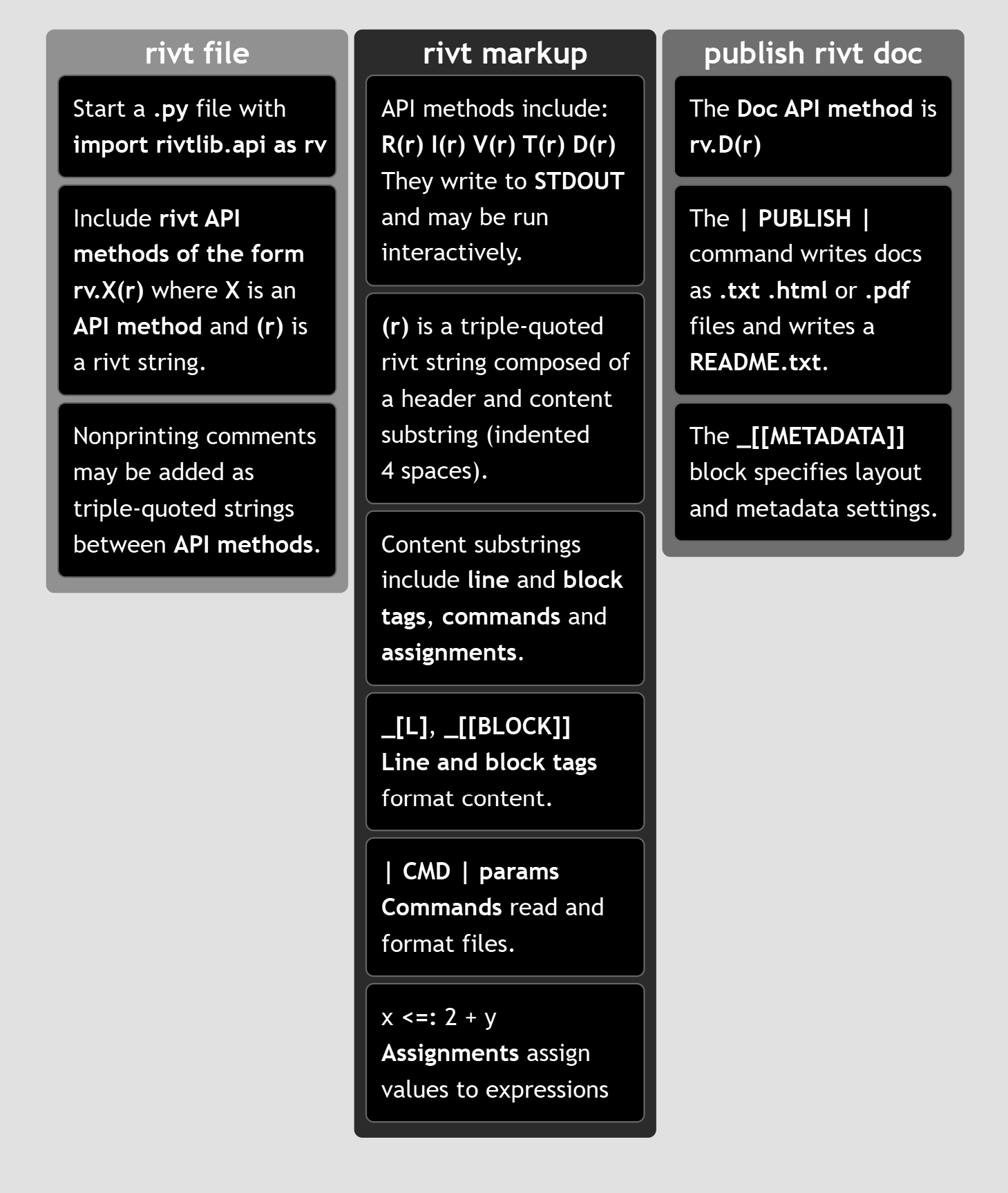
The example file used in the tutorial, along with three other report and rivtbook example files, are provided at google drive. The four examples provided include the rivt file with source files, published docs in each format, and the README.txt file.
- Example 1
An example file that illustrates common API functions and rivt markup. The %% marks provide cell level navigation in a side pane of VSCode and may be auto inserted with keystrokes when the rivt profile is used.
- Example 2
An example that illustrates the use of Python functions.
- Example 3
An example rivt report. Reports are assembled through a report script - make-report.py stored in the rivt-report folder.
- Example 4
An example rivtbook. rivtbooks are collections of rivt files with a common subject matter organized for efficient selection and inclusion in docs and reports.
[2] tutorial - Example 1#
rivt files can be created from scratch as a .py file or by making a copy and editing an existing rivt file. The rivt file contents are shown in the dropdowns. The complete file is shown in the next chapter. After initialization, any API can be used except for rv.D(r) which stops file processing and triggers a doc output.
Unit definitions are here. New units may be defined in the add-units.py file in the rvsrc/scripts folder.
[ 1 ] Add import statement
Following the import statement, comment settings may be added if defaults need to be changed. Triple quoted comments can be added between API methods. They are not indented and are not part of the doc
""" This is a rivt doc example.  It is used in the tutorial at
https://www.rivt.info. .

This example illustrates:

    rivtlib markup
    - Multiple API sections (chapters)
    - Footnotes
    - Inline comments
    - Url links
    - Variable definitions
    - Table blocks and commands
    - Value table command
    - Metadata and layout block
    - Python function command
    - Image command
    - Publish command

    VSCode / Python features
    - cell labels
    - docstrings
    - extensions

"""

import rivtlib.rvapi as rv

# cooment settings are only needed if defaults are changed.
# rv set_width = 80  ; character width of text output (80)
# rv no_tag = true ; if false, the API type is added to section number (true)
# rv private = true ; if false, default section heading changed to public (private)
[ 2 ] Add API method - rv.I
See header and content reference for rivt string details. This section includes footnote [#] and link [U] tags.
# %% rv.I("""Summary and Loads
rv.I("""Summary and Loads

    This rivt file example calculates the maximum stress and deflection in a
    simply supported, uniformly loaded beam using E-B theory _[#]. It also
    serves as an annotated example of a single rivt doc with multiple sections
    that is not part of a report.

    The example illustrates the use of some of the most common API functions,
    commands and tags. Further details are provided in the
    _[U] rivt user manual, https://www.rivt.info |.

    The file may be formatted as a text, PDF or HTML doc by changing the type
    parameter in the PUBLISH command at the end of each rivt file (Doc-API
    *rv.D*). Published files are found in the _published folder.
""")
[ 3 ] Add API method - rv.I
This section includes inline comments ( ## ) and [[TABLE]] blocks. The # %% marks provide interactive execution and file navigation in a side pane of VSCode and may be auto inserted with keystrokes when the rivt profile is used.
# %% rv.I("""Load Combinations
rv.I("""Load Combinations

    ## Comments with double hashes will not appear in the doc

    Dead and live loads effects are taken from ASCE 7-05 _[#]

    _[[TABLE]]  Load Effects
    ============= ================================================
    Equation No.    Load Combination
    ============= ================================================
    16-1           1.4(D+F)
    16-2           1.2(D+F+T) + 1.6(L+H) + 0.5(Lr or S or R)
    16-3           1.2(D+F+T) + 1.6(Lr or S or R) + (f1L or 0.8W)
    ============= ================================================
    _[[END]]
""")
[ 4 ] Add API method - rv.V
This Value section includes the | VALTABLE | and | IMAGE | commands, the _[C] and _[T] tags, and the assignment operators ==: and <=: .
# %% rv.V("""Loads and Geometry
rv.V("""Loads and Geometry

    Value definitions are formatted as a table. Variable values are
    defined with the define operator. The line tag [T] labels and
    numbers the table. Units are listed here. New units may be defined
    in the add-units.py file in the rvsrc folder.

    Define Unit Loads _[T]
    D_1 ==: 3.8 * p_sf | p_sf, kPA, 2 | joists DL
    D_2 ==: 2.1 * p_sf | p_sf, kPA, 2 | plywood DL
    D_3 ==: 10.0 * p_sf | p_sf, kPA, 2 | partitions DL
    D_4 ==: 2 * 1.5 * k_ft | k_ft, kN_m, 2 | fixed machinery DL
    L_1 ==: 40 * p_sf | p_sf, kPA, 2 | ASCE7-O5 LL
    b_1 ==: 10 * inch | inch, mm, 2 | beam width
    h_1 ==: 18 * inch | inch, mm, 2 | beam depth
    E_1 ==: 29000 * k_si | k_si, MPA, 2 | modulus of elasticity
    Fb_1 ==: 20000 * p_si | p_si, MPA, 2 | allowable stress

    The VALTABLE command reads variable values from a file in the rvsrc
    folder. The description is the table title, followed by the max
    column width.

    | VALTABLE | rvsrc/beam1.csv | Beam Geometry, 40

    ## The IMAGE command inserts an image file with caption, % scale, num;non option
    | IMAGE | rvsrc/img/beam1.png | Beam Diagram, 60, num, not

    Uniform Distributed Loads _[C]
    dl_1 <=: 1.2 * (spc_1 * (D_1 + D_2 + D_3) + D_4) | k_ft, kN_m, 2 | Dead load [ASCE7-05 2.3.2]

    ll_1 <=: 1.6 * spc_1 * L_1 | k_ft, kN_m, 2 | Live load [ASCE7-05 2.3.2]

    omega_1 <=: dl_1 + ll_1 | k_ft, kN_m, 2 | Total load [ASCE7-05 2.3.2]
    """)
[ 5 ] Add API method - rv.V
This Value section includes the | PYTHON | and | IMAGE2 | commands, the _[B] and _[M] tags, and the assignment operators :=: and <=: .
# %% rv.V("""Beam Stress
rv.V("""Beam Response

    The following lines import the beam geometry from an external file,
    calculate section properties from imported functions and calculate
    the maximum moment, bending stress and mid-span deflection.

    | PYTHON | rvsrc/scripts/sectprop.py | Beam functions

    section_1 :=: rectsect(b_1, h_1) | in3, cm3, 2 | rectangle - S (sectprop.py)

    inertia_1 :=: rectinertia(b_1, h_1) | in4, cm4, 1 | rectangle - I (sectprop.py)

    | IMAGE2 | rvsrc/img/ss-beam2.png, rvsrc/img/ss-beam1.png | Moment diagram, Deflection diagram,46,54,num,num

    Maximum bending stress formula _[B]

    ##  The line tag [M] formats the equation using utf-8 text.
    σ1 = M1 / S1 _[M]

    m_1 <=: omega_1 * spn_1**2 / 8 | ftkips, mkN, 2 | Mid-span UDL moment

    fb_1 <=: m_1 / section_1 | p_si, MPA, 1 | Bending stress

    fb_1 < Fb_1 | k_si, 2, OK, >>> NOT OK | Stress ratio

    delta_1 :=: midspan_delta(spn_1, omega_1, E_1, inertia_1) | inch, mm, 2 | mid-span deflection (sectprop.py)
    """)
[ 6 ] Add API method - rv.R
The Run API does not use commands or tags in the content substring. The header substring includes a type parameter identifying the content text or script. In this case the API is used for endnotes. See rv.R Markup.
# %% rv.R("""doc notes | endnotes
rv.R("""doc notes | endnotes
    "Euler-Bernoulli beam theory", Wikipedia, Wikimedia Foundation. [Online].
    https://en.wikipedia.org/wiki/Euler_Bernoulli_beam_theory.
    [Accessed: Jun. 15, 2026].

    ASCE/SEI 7-05, Minimum Design Loads for Buildings and Other Structures,
    American Society of Civil Engineers, 2005.
    """)
[ 7 ] Final API method - rv.D
The Doc API publishes formatted docs and then exits the rivt file. The primary tag is the _[[METADATA]] block which includes the doc metadataand layout settings. The primary command is the | PUBLISH | command which specifies the doc title and type. The | PDFATTACH | command may be used to attach a PDF file to the doc. See rv.D Markup.
# %% rv.D("""Publish Doc
rv.D("""Publish Doc

    A rivt file may be published as a text, PDF or HTML doc by specifying the
    PUBLISH type parameter as txt, pdf or html.

    Published files are found in sub-folders of the _published folder. A text
    version of the doc or report is is always written to the rivt and
    _rivt-public folders as a README.txt file. READMEs are formatted and
    displayed on the first page of a GitHub repo.

    | PUBLISH | Example 1 - rivt Doc | pdf

    _[[METADATA]]
    [doc]
    authors = R Holland
    version = 1.0.0a12
    repo = https://github.com/rivt-info/rivt-single-doc
    license = https://opensource.org/license/mit/
    copyright = -
    fork1_authors = -
    fork1_version = -
    fork1_repo = -
    fork1_license = https://opensource.org/license/mit/

    [layout]
    subtitle =  UDL Beam
    copyright = --
    client = Attn: User Example
    coverpage = true
    coverlogo_size = 30
    coverlogo = logo1.png
    runninglogo = logo2.png
    runninglabel = rivt
    project_ref = proj. 0001
    pdf_pagesize = letter
    pdf_margins = 1in, 1in, 1in, 1in
    pdf_link_underline = false
    ; colors - red, blue, green, yellow, black, gray, brown
    ; lightblue, magenta, lime, maroon, gray, olive, cyan
    pdf_link_color = brown
    ; toc levels: 1 - includes subdivisions, 2 - also includes sections
    toc_level = 2

    [process]
    doc_verbose = true; if false minmize output during doc processing
    auto_cfg = true ; if false, config files are not updated from rivt file
    _[[END]]
    """)