
C.3 | rivtbooks#
[1] rivtbooks#
A rivtbook collects rivt files sharing a common theme under a folder structure that allows direct copy and paste into rivt docs and reports. Its primary purpose is as an organized collection of files that can be directly selected and copied into rivt docs and reports as shown in diagram below.
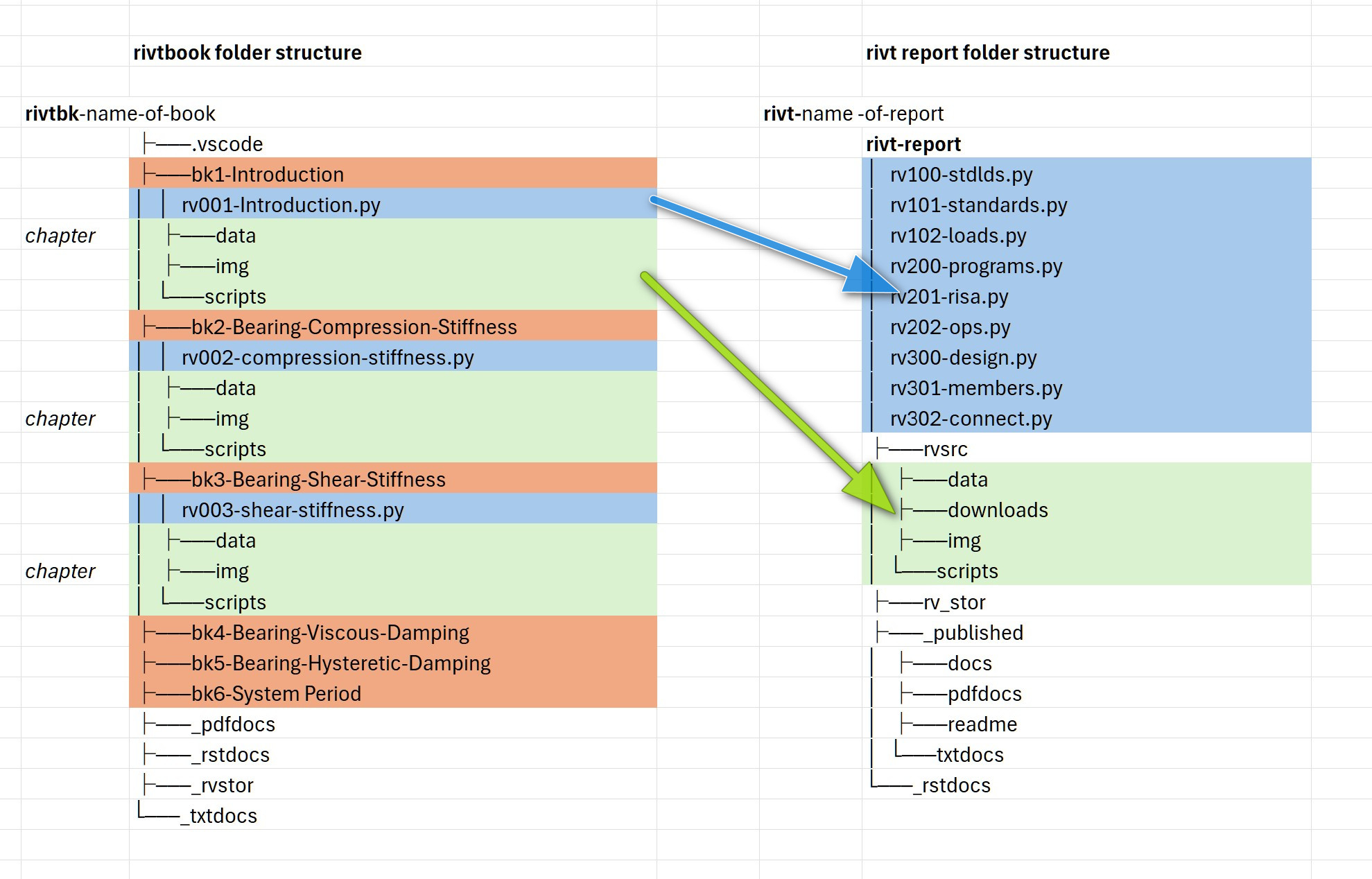
A rivtbook may be printed as a PDF, txt and README.txt file for review and exploration using the rivtbook-report.py script.
[2] rivtbook Folder#
A typical rivtbook folder structure is shown below. The required rivt file names and prefixes are shown in brackets. For the report folder structure see see.
Folder Naming
A rivtbook folder can contain any file or folder but the following structure is
required for rivtbook processing. rivtbook folders include at
least the folders and files shown in brackets[] below. Folders with an
underscore contain rivt generated files. Files and folders are organized under
a rivtbk root folder with the prefix rivtbk- followed by the
rivtbook label, e.g. rivtbk-Book-Label.
A new rivtbook folder is typically started by copying and editing a
similar folder. Several rivt-folder examples can be downloaded at
openmodels.info.
rivtbook Top Level Folders
[rivtbk-]Book-Label/            rivtbook report folder
    ├── .help/                      help files
    ├── .vscode/                    optional VSCode settings
    ├── README.txt                  rivt-generated book as text
    ├── [_rivtbk-public]/           public subset of rivt files
    ├── [_rstdocs]/                 restructured text files
    ├── [_pdfdocs]/                 PDF docs and report
    ├── [rvbk101-]folder name       rivtbook folder
    ├── [rvbk102-]folder name       rivtbook folder
    ├── [rvbk201-]folder name       rivtbook folder
         ...
rivtbook Expanded Folders
[rivtbk-]Book-Label/             rivtbook report folder
    ├── .help/                        help files
    ├── .vscode/                      optional VSCode settings
    ├── README.txt                    rivt-generated book as text
    ├── [rivtbook-report]-1.py        rivtbook generating script
    ├── [_rivtbk-public]/             public subset of rivt files
        ├── [rvbk-101-]folder name    rivtbook folder
        ├── [rvbk-102-]folder name    rivtbook folder
        ├── [rvbk-201-]folder name    rivtbook folder
            ...
    ├── [_rstdocs]/                   rivt-generated rst files
        ├── _downloads/
        ├── _static/
        ├── rv101-filename1.rst
        ├── rv102-filename2.rst
        ├── rv201-filename3.rst
            ...
    ├── [_pdfdocs]/                   pdf docs and rivtbook report
        ├── pdf auxiliary folders
        ├── report-title.pdf
        ├── rv101-filename1.pdf
        ├── rv102-filename1.pdf
        ├── rv201-filename3.pdf
    └── [_rv_stor]/                    rivt-generated source files
        ├── [logs]/                          log files
            ├── rv101-log.txt
            └── rv102-log.txt
        ├── [sect]/                          sections not printed
            ├── rv202-5d.txt
            ├── rv103-4t.txt
            └── rv301-2r.txt
        ├── [temp]/                          temp files
            └── rv101-label3.tex
        ├── [vals]/                          values files
            ├── v101-2.csv
            └── v102-3.csv
        └── output.dat
    ├── [bk1-]folder name              rivtbook chapter folder
        ├── [rv001-]filename1.py          rivt file
        ├── [downloads]/                    files to download
            └── conc-vals.txt
        ├── [img]/                          page layout images
            ├── favicon.png
            ├── covlogo1.png
            ├── runlogo1.png
            └── fig1.png
        ├── [data]/                          tables
            └── steel-vals.csv
        ├── [vals]/                          values files
            ├── v101-2.csv
            └── v102-3.csv
        └── tools/                           OS shell commands
            └── opensees.sh
    ├── [bk2-]folder name             rivtbook chapter folder
            ...
    └── [bk3-]folder name             rivtbook chapter folder
            ...
[3] rivtbook Application#
rivtbooks are organized to simplify selection of rivt files for inclusion in rivt docs and reports. Typical use involves the following steps. To insert a rivtbook subdivision into a rivt doc or report:
Copy the rivt file within a rivtbook subdivision folder to the rivt-report folder of the target report or doc and edit the rivt doc number.
Within the same subdivision folder copy all resource files and folders and paste (merge) them into the rvsrc folder of the target report or doc. A single copy and paste command will merge all of the required files.
The subdivision from the book is now inserted as a subdivision in the report, where further edits can be made.