
A.2 | Run rivt#
[1] Summary#
This section covers installation of rivt and running examples. rivt files may be edited in a simple text processor and run from the command line but efficient editing and compiling is typically done in an IDE. Any Python IDE may be used, but VSCodium with extensions is the IDE component used in rivtStudio.
There are three ways to run rivtlib.
For most users the best way to get started is to download rivtStudio (~1 GB zipped, ~2 GB expanded). For further details see here.
#. For users familiar with Github or containers in general, a version of rivtStudio named rivtRemote may be run in the browser. Further details are here.
For users familiar with Python, the rivtlib packagemay be installed at the system level using pip or uv. Further details are here.
[2] rivtStudio#
A typical rivtStudio layout for editing a rivt file is shown below.
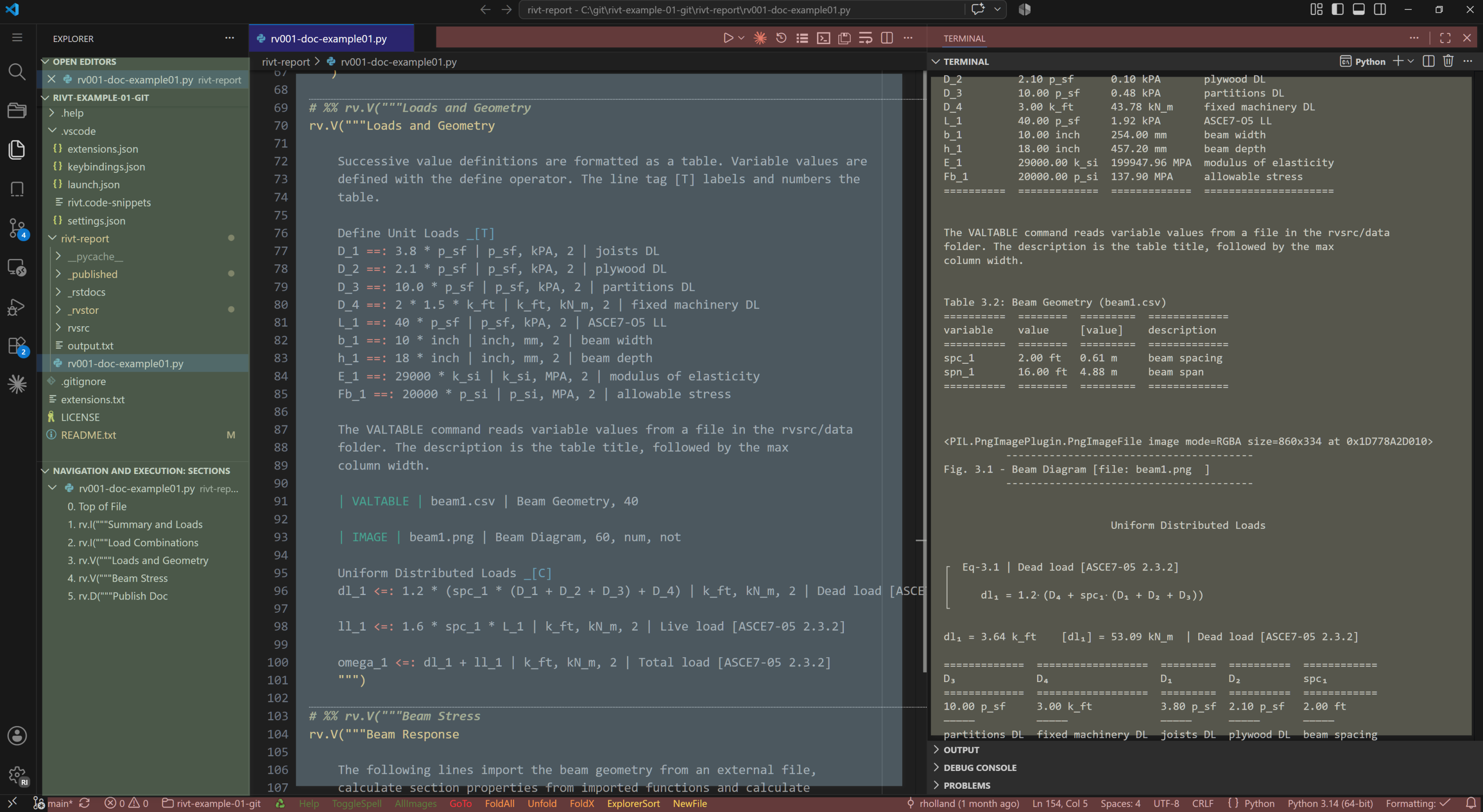
rivt files and docs in VSCode (click on image to enlarge)#
The rivt file is in the center editing panel[blue]
The text doc output is in the right panel[brown].
The file explorer is the far left panel [green]. rivt and doc files are accessed in the file explorer.
Extension buttons are located on the top and bottom status bars [red].
Links to individual rivt file sections are provided in both the navigation panel and in the text doc output. An example rivt file, docs and tutorial are here and may be downloaded for local use
Install rivtStudio
rivtStudio may be downloaded from Github. The rivtStudio zip file naming convention uses semantic versioning. When an “a” is appended it indicates an alpha release.
rivtStudio-major#.minor#.patch#
The zip file contents must be unzipped into a directory with read-write access which is typically the users home folder or a flash drive. After unzipping, click the rivtStudio shortcut to open the interface.
Open the rivt project folder.
Accept the trust prompts as needed.
Navigate to the example report folder
Open the example rivt file (.py)
Click on the triangle in the upper right of the editor to run the file and output text, pdf or html docs, depending on the | PUBLISH | setting. See the publish settings for details.
rivtStudio includes preinstalled extensions designed to simplify editing navigation and running rivt files. They are listed in rivtStudio settings and may be explored and modified in the interface.
[3] rivtRemote#
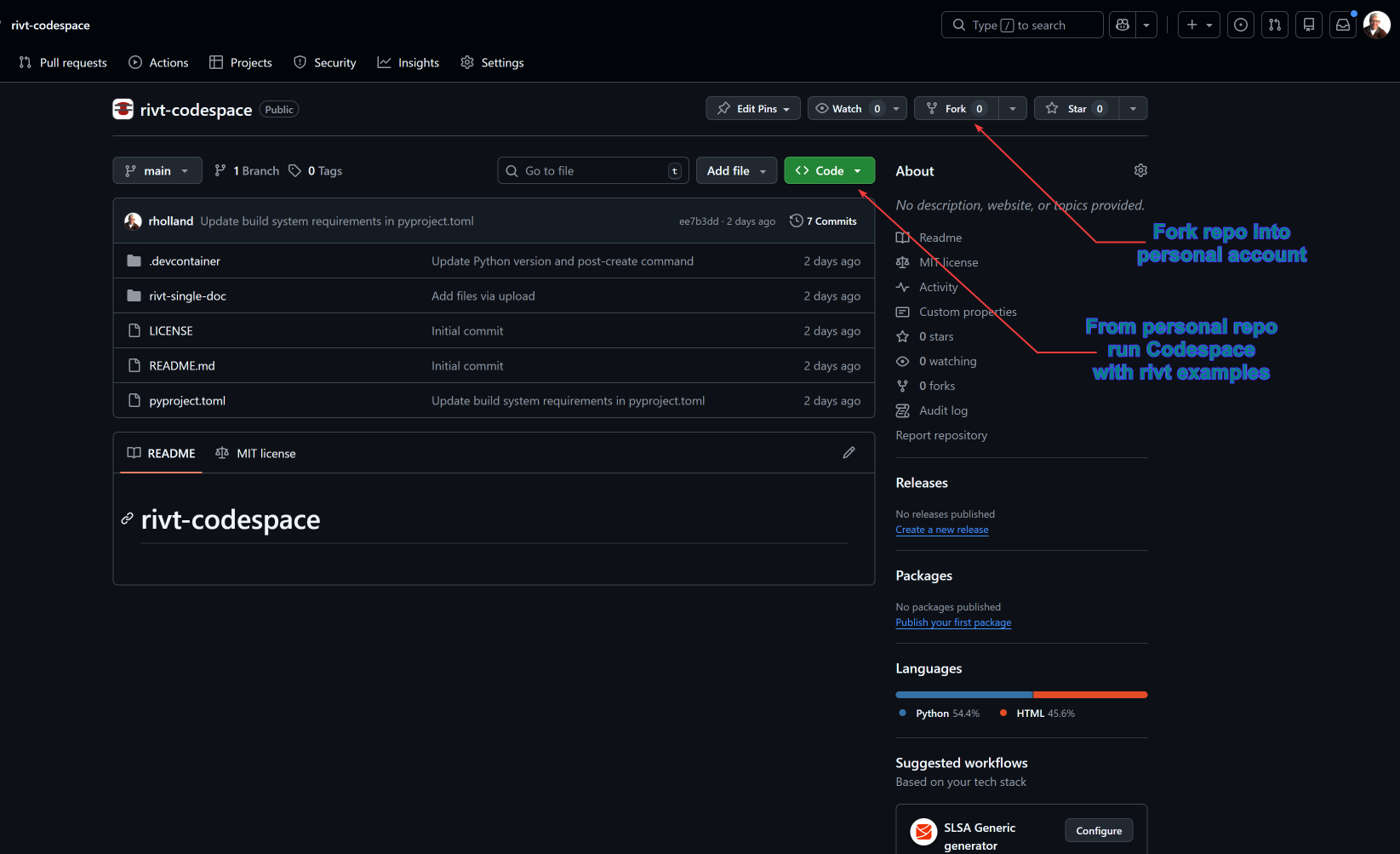
For users with a GitHub account or limitations on running local software, the best way to get started is to fork and run rivtRemote in a browser.
VSCode is a customizable code editor that can be run locally or in the cloud. The cloud version of VSCode is referred to as a Codespace . A rivt Codespace is a VSCode cloud environment with rivt extensions for editing and running rivt files.
Codespaces are run in a personal GitHub account. When rivtstudiospace is forked into a personal account and run, an example rivt file is loaded. The example file may be run and edited in the Codespace and the rivt interface extensions may be explored.
The first time a rivtstudiospace is run, it may take a few minutes to load and initialize the environment. After it is set up, it will load in a few seconds. The same delays apply to running a rivt file. The first time will be a minute or two to compile the Python files. Subsequent runs will be a few seconds. The rivtstudiospace environment is persistent and will save any changes made to the example files.
Steps for running rivtstudiospace are provided in the README here.
[4] rivt System#
rivt may be installed into a system level Python.
A list of the installed dependencies is here.
rivt may also be installed and isolated environment using the uv package manager. The primary advantage of uv is the simplicity of insalling and updating packages while keeping them isolated from the system Python.
rivt-uv installation is recommended for users with some familiarity with Python and programming.