
A.1 Introduction#
[1t] Motivation#
rivt is an open source software project that simplifies sharing and reuse of engineering documents. These document types are generally complex. They include text, images, tables, calculations, models and computer code organized into large reports.
Because they are used in official capacities and include standards and codes (e.g. permitting), they need to be clear and concise. Because they are modified as engineering designs evolve they need to be flexible and easy to update. And because they are both standardized and complex, sharing and reuse can improve efficiency and quality.
However sharing and reuse is restricted in available programs by the software design and terms of use:
documents written by different programs are incompatible
frequent software updates are needed to maintain document access
update costs are high
newer document formats become inaccessible without upgrades
software is limited to specific platforms
document version control is limited
report generation features are limited
collaboration features are limited
rivt is designed to reduce repetitive work and improve document quality through sharing and reuse. The table below summarizes and compares limitations between different software programs.
Software Comparison
[2t] Overview#
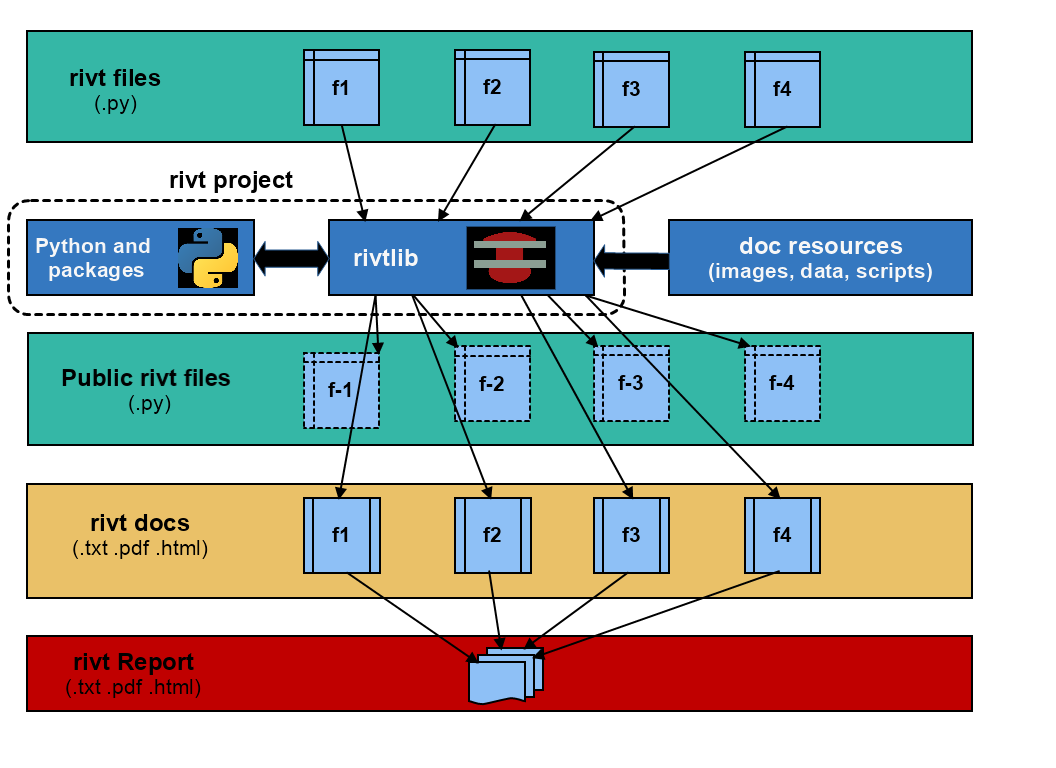
A rivt file publishes a formatted rivt doc as a text, PDF or HTML file. A rivt file is a Python file (.py) that imports the rivtlib Python package and includes rivt markup. A collection of rivt docs may be collated as a rivt report.
rivt file examples are provided here and here. An interface for searching rivt files on GitHub is here. All or parts of a rivt file the author chooses to share as a public rivt file can be shared under an Open Source license. rivt itself is distributed under the MIT open source license . (see [2t] Licenses).
The rivt API includes API functions, markup and files. The API is designed to be:
- lightweight
rivt markup is made up of about 3 dozen tags and commands, and wraps reStructuredText.
- flexible
A rivt file produces a text, HTML or PDF doc. Multiple docs can be organized into a report.
- extensible
rivtlib is written in Python with direct access to thousands of Python packages.
rivt Doc Processing
[3t] API functions#
rivt is an acronym taken from the four, primary API functions.
API Functions |
Name |
Purpose |
|---|---|---|
rv.R(rS) |
R un |
Run shell commands |
rv.I(rS) |
I nsert |
Insert static resources |
rv.V(rS) |
V alues |
Calculate values |
rv.T(rS) |
T ools |
Python and markup scripts |
rv.D(rS) |
Doc |
Publish docs |
rv.S(rS) |
Skip |
Skip section (comments and debugging) |
rv.X(rS) |
Exit |
Exit rivt (debugging) |
Most of a docs’ content is written using the Insert (rv.I) and Value (rv.v) API’s.
Content Functions- The Run executes shell commands.
- The Insert adds static table, image, equation and text content.
- The Values evaluates equations and functions.
- The Tools runs reStructuredText, HTML, LaTeX and Python scripts.
- The Doc specifies the doc type and style.
- The Skip can be used for interactive debugging and comments.
- The Exit can be used for interactive debugging.
When interactive IDEs like VSCode or Spyder are used to edit and run rivt files, API functions can be processed spearately as cells (similar to Jupyter Notebooks) using the standard prefix notation:
# %% optional label
An optional label is used for built in IDE bookmarking functions. Refer to B.3 VSCode Settings for further details.
Each API function takes a single rivt string argument (rS) as input, and outputs formatted text or restructuredText that in turn is processed into a text, HTML or PDF doc. The rivt string is written in rivt markup.
[4t] Markup Overview#
An API function starts in the first column and takes a triple quoted rivt string (rS) argument. The first line of a rivt string is a header substring, followed by a content substring indented 4 spaces for improved readability and section folding.
The header substring specifies the section title and other processing parameters. The content substring includes rivt markup and other arbitrary text. For further details see here.
rv._("""Section Label | parameters

     Content text that is
     indented four spaces.

    ...

    """)
[4t] Folder/Files overiew#
A rivt file is a Python plain text file ( .py ) that includes rivt markup and imports the rivtlib package and API into the rv namespace:
import rivtlib.rvapi as rv
rivt files are stored in a root folder designated with the prefix rivt-. Each rivt file and corresponding rivt doc has a prefix that is used to organize the report. The prefix has the form
rvANN-filename.py
where A is an alpha-numeric character used for organizing report divisions, and NN is a two digit number used to organize sub-divisions. The file name is used as the doc title unless overridden in rv.D. Use underscores or hyphens rather than spaces to seprate words in the file name. They are replaced with spaces when a doc title is extracted.
Folder Key- Required names or prefixes are shown in brackets [ ].
- Required folders start with a capital letter.
- Folders that contain author provided files are marked with a single vertical bar ( | ).
- Folders that contain rivtlib generated files are marked with a double vertical bar
Primary Folders
[rivt]-Report-Label/                Report Folder Name
    ├── [rv101-]filename1.py        | rivt file
    ├── [rv102-]filename2.py        | rivt file
    ├── [rv201-]filename3.py        | rivt file
    ├── [rv202-]filename4.py        | rivt file

    ...

    ├── [Public]/                   || public rivt files
    ├── [Publish]/                  || doc and report files
    ├── [Src]/                      |  source files provided by authors
    ├── [Stored]/                   || stored files written by rivtlib
    └── README.txt                  || searchable text report
The four primary rivt folders are:
- Public
Stores public rivt files generated by rvitlib. File content intended for sharing is defined by section headers. Public rivt files are identified by a hyphen after the rv prefix e.g. rv-101-filename1.
- Publish
Stores docs and reports generated by rvitlib
- Src
Stores images, data, code and text provided by the author.
- Stored
Stores files generated by rvitlib. Files include stored sections identified in headers, api log files and processing log files. Files may be attached to a report.
The complete folder structure with subfolders is shown here.
[5t] Doc/report overview#
Each rivt file outputs a corresponding doc in the format specified in rv.D. A doc number has the form:
rvAnn-filename.py
where rv is a required prefix, A is an alphanumeric character and nn are two digit non-negative integers.
A rivt report is organized using the rivt doc numbers. If the rivt file names are:
rvA01-filename.py
rv105-filename.py
rv212-filename.py
the report numbers would be:
A.1 (division A, subdivision 1)
1.5 (division 1, subdivision 5)
2.12 (division 2, subdivision 12)
Note that leading zeroes are dropped. Docs are sorted alpha-numerically into divisions and subdivisions in the report.
Docs are assembled from sources and published using a specified folder structure. The singledocB variable overrides the default report structure and specifies that resource files and docs are read from and written to the rivt file folder. It is intended for simpler, standalone docs with more limited format control. The comment variable is specified immediately after the import statement:
import rivtlib.rvapi as rv

# rv singledocB = True
The default setting is False.
here.